
The generated address is a routing destination
When Alwahmi creates an address, it chooses a random mailbox name on the alwahmi.com domain. The address does not create a conventional user account, password, disk folder, or long-term identity. It gives the receiving system a destination key that can be matched when an incoming message arrives.
The random name reduces casual guessing, but randomness is not authentication. Anyone who learns the complete address may be able to request its retained messages, which is why the address should never receive secrets or information whose confidentiality matters.
DNS tells the sender where to deliver mail
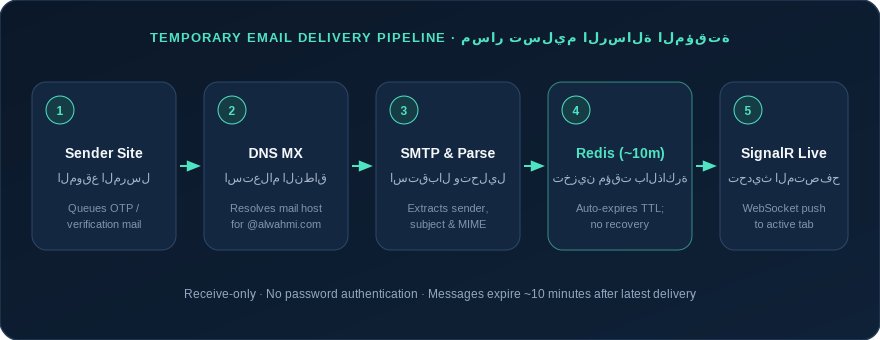
After a website hands a message to its mail provider, that provider looks up mail-exchanger records for the recipient domain. Those DNS records identify the servers prepared to accept mail for alwahmi.com. The sending server then opens an SMTP conversation with a receiving server and offers the sender, recipient, and message data.
Delivery can be rejected before content is accepted, deferred for a later retry, or accepted successfully. Sender reputation, DNS problems, rate limits, message size, malformed data, and temporary network failures can all affect this stage. A “sent” notice in another website’s interface does not prove that the receiving server accepted the message.
The receiver parses and stores a short-lived record
Once accepted, the service extracts the recipient, sender, subject, text or HTML body, message identifier, and arrival time. Alwahmi stores the resulting inbox record in Redis under the generated address. The current storage timer is refreshed when a new message reaches the same address, so server retention is tied to the most recent delivery rather than only to when the browser opened.
Email is untrusted input. Display code must treat sender names, HTML, links, and attachments cautiously because a message can contain misleading formatting or hostile destinations. The service’s ability to parse a message does not certify that its sender or content is safe.
A live connection updates the open page
The browser subscribes to updates for the generated address through a live SignalR connection. When a message is saved, the server can notify the open page instead of waiting for constant manual refreshes. A restored tab can also request messages that still exist in temporary storage.
The displayed browser countdown and the storage timer describe a short session, not a service-level guarantee. A deployment, connection loss, parsing error, sender rejection, or expired storage key can leave the inbox empty. Temporary email is convenient precisely because it has fewer promises than a durable mailbox.
| Pipeline Stage | Technical Role | Symptom When This Stage Fails |
|---|---|---|
| 1. Sender Application | Queues verification mail or blocks disposable domains up front | Message never leaves the sender despite a generic “code sent” UI message |
| 2. DNS MX Lookup | Resolves the receiving mail host for alwahmi.com | Sender MTA defers or bounces delivery before connecting |
| 3. SMTP & MIME Parse | Accepts recipient envelope and extracts sender, subject, and body | Malformed, oversized, or rate-limited messages are rejected |
| 4. Redis TTL Storage | Holds parsed messages under an expiring ~10-minute key | Expired inbox records disappear permanently and cannot be restored |
| 5. SignalR WebSocket | Pushes real-time arrival events to the subscribed browser tab | Live badge disconnects; refreshing within the active window reloads stored mail |
Primary references
These references support the technical and safety principles used in this guide.